

VOICE EDITING IN ADOBE AUDITION
Handy Settings for Removing “Hiss”
Many training courses you develop may require some narration, and nothing does a better job than Adobe Audition for both recording and editing audio.
For example, you have recorded a voiceover for a CBT, but background noises called hiss are evident. Hiss comes from electrical hums, computer fans, or any background noise that isn’t very dynamic and stays the same throughout the recording room.
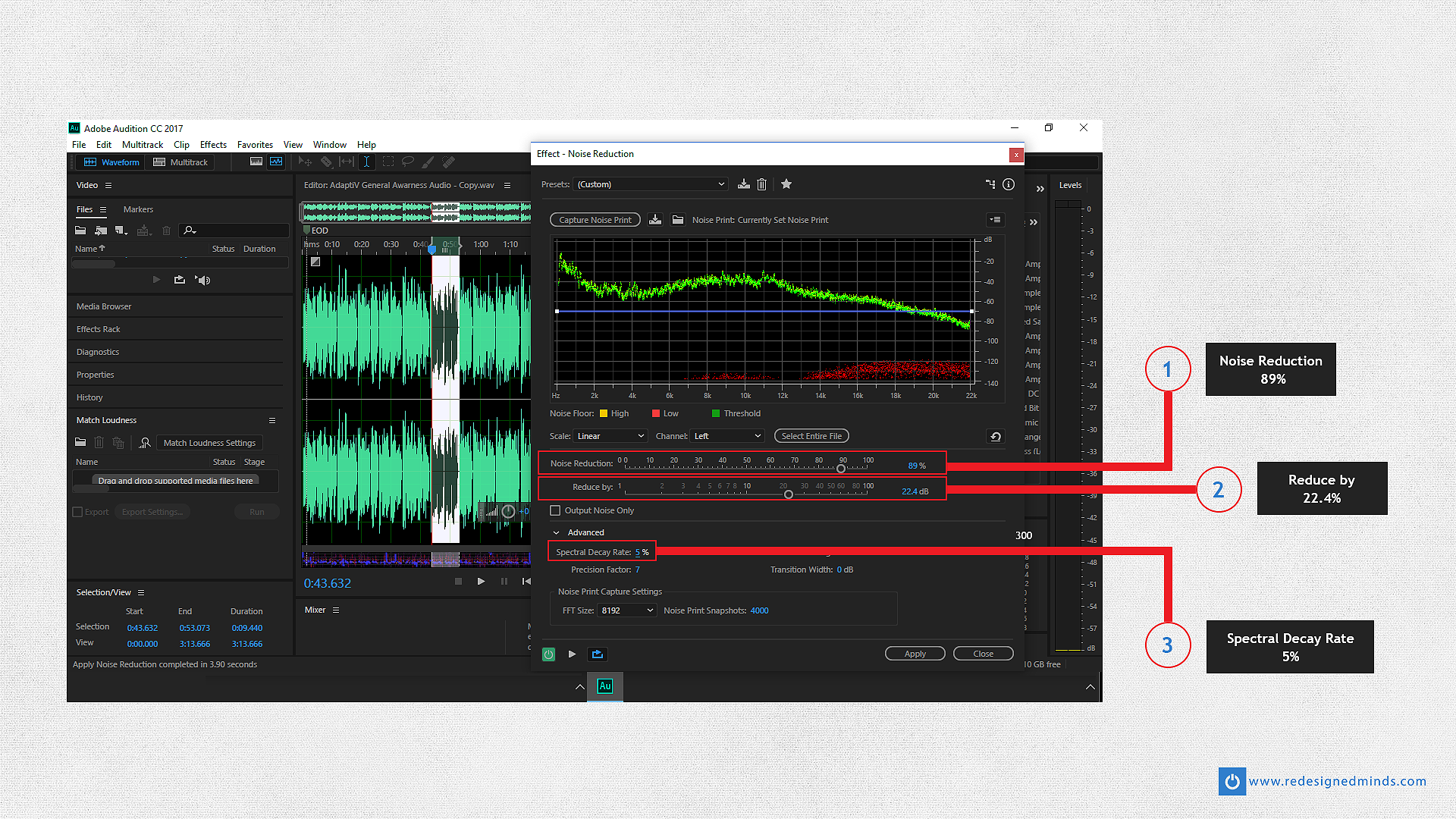
Using Adobe Auditions Noise Reduction Effect like a pro will make your voice over sound sharp, using three numeric settings that have worked wonders for me.
Firstly, set the Noise Reduction effect to 89%. This effect figures out how much blends with the original unprocessed file.
Secondly, set the Reduce by effect to 22.4%. This effect measures how much of the noise is being turned down by decibels.
Thirdly, set the Spectral Decay effect to 5%. This measures how much of the noise is left in other sounds, if set too low, it may sound bubbly. If your voice over sounds like a big hole reverb rather than an office recording, it’s most likely due to Spectral Decay being too high.
Are you having problems with your voice-over editing?
Contact me for support!
Leave a Reply
Want to join the discussion?Feel free to contribute!